Plasma Keyboard: FLOSS/Fund, diacritics, and more
Plasma Keyboard has interesting news to share!
Plasma Keyboard started out life as KDE's virtual / on-screen keyboard, and now it is evolving to also support tools and features for our physical keyboards.
FLOSS/Fund
Plasma Keyboard was granted funding from the FLOSS/Fund program's second tranche, for which we are very grateful! This funding has ensured we will be able to put some sustained effort towards refining and improving the project — and I have been doing just that for the past couple of months.
I began by getting more familiar with the codebase, lists of open bugs, and feature requests. I also did some refactoring and cleanup, improved the CI and MR review process, etc.
Diacritics
https://invent.kde.org/plasma/plasma-keyboard/-/merge_requests/83
The first feature I tackled is the first one that is for physical keyboards rather than virtual/on-screen keyboards: diacritics — the variants of a character that indicate a difference in pronunciation, such as ç, ñ, or ü. Though it is more than just diacritics, because it also supports common/popular symbols, such as ™, — (em-dash), →, ¡, ‽, ¼, ≥, ≠, etc.
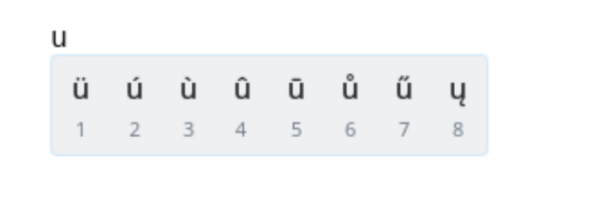
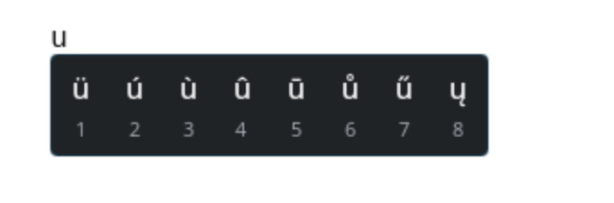
If you'd like an idea of which diacritics and symbols are currently included, you can check out the base mapping json. Further mappings are included depending on which language(s) you have enabled for Plasma Keyboard in your system settings.
This feature allows users to long-press a key on their physical keyboard to access a popup menu of diacritics and symbols related to that key, and select one to input it. This is a common feature on mobile keyboards, and I personally think this is a great improvement over using something like a compose key for the same purpose.
Selecting an option from the popup menu can be done multiple ways:
- Pressing the associated keyboard number key shown below the option
- Clicking on the option with the mouse
- Using the arrow keys to navigate to the option and pressing
Enter
This was pretty challenging to implement; I previously had no experience with Wayland protocols or input methods, so it required a lot of research, reading, learning, and experimentation to figure it out. Difficult, but rewarding!
One of the really cool things about Plasma Keyboard is that it is available as a Flatpak — so if you are adventurous and want to try out the diacritics feature before it is released to the stable version, you can do so with the nightly Flatpak builds!
flatpak install --user --or-update https://cdn.kde.org/flatpak/plasma-keyboard-nightly/org.kde.plasma.keyboard.flatpakref
Then simply enable Plasma Keyboard in System Settings → Keyboard →
Virtual Keyboard! 🤯 If you already have a version of Plasma Keyboard
installed, a quick restart or log out/in might be needed for the new version to
take effect.
Future Plans
In addition to the diacritics feature itself, I also laid the groundwork with it for future features that will make use of the same overlay/popup system and physical keyboard integration — stay tuned for more news on that! 😉
There are a bunch of other plans for features and improvements that we'd like to work on, for example: swipe typing, voice typing, making the on-screen keyboard movable and resizable, adding tests and improving performance and reliability, etc.
There is a lot of work to be done, and we are excited to keep improving Plasma Keyboard and making it even more powerful and user-friendly — just like the rest of Plasma! 🚀
If you are interested in contributing, please check out the project on KDE's GitLab: https://invent.kde.org/plasma/plasma-keyboard